
Capture
Use Trip Photo Scanner for a completed-trip screenshot, or Full Entry to enter it manually. Review the details before saving.
The all-in-one business app for Australian rideshare drivers. You’re not just driving. You’re running a business. Bring trips, fare comparisons, expenses, Vehicle Logbook, Tax & BAS estimates and income reports together.

Australian rideshare business app
Bring your trip records, fare checks, receipts, logbook and reports together before the paperwork piles up.
Auto-detect travel, scan trip screenshots or enter a trip in full.
Compare fares, review discrepancies and capture receipts or other income.
Prepare logbook, BAS, EOFY, income and Google Sheets outputs for review.
Add a trip, check the details, save it and review the fare comparison in your records.
Use Trip Photo Scanner for a completed-trip screenshot, or Full Entry to enter it manually. Review the details before saving.
Save the trip, then review the fare comparison when sufficient details and applicable rate data are available. Return to the record in Trip History.
Classify travel, scan expenses and build logbook, BAS, income and Google Sheets records.
Connect the work you do on the road with the records you need off it.
Compare duration, distance, category, surge, wait time, reservation fee and actual fare.
Review detected trips when you arrive home and classify them as business or private.
Extract editable details from a completed-trip screenshot. Add a second image when the details are split across two screens.
Scan receipts, flag GST and track business-use percentages and deductible totals.
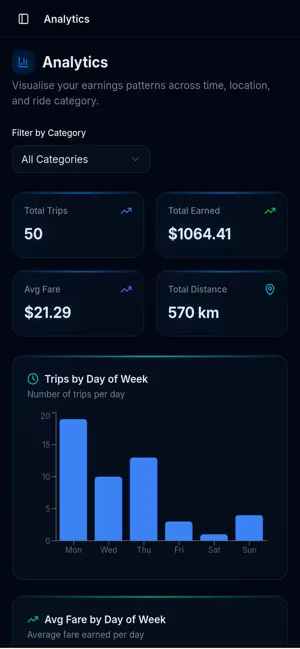
Understand trends by day, hour, category and suburb, with AI-generated observations.
Create BAS and EOFY estimates, income substantiation PDFs and formatted Sheets exports.
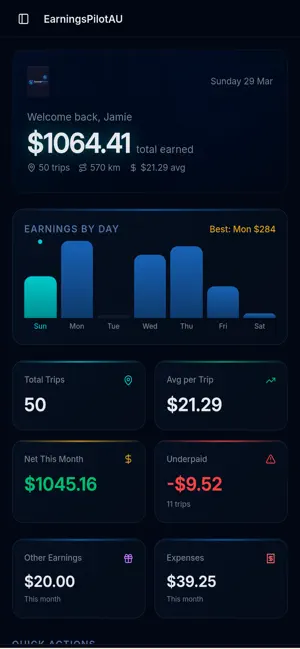
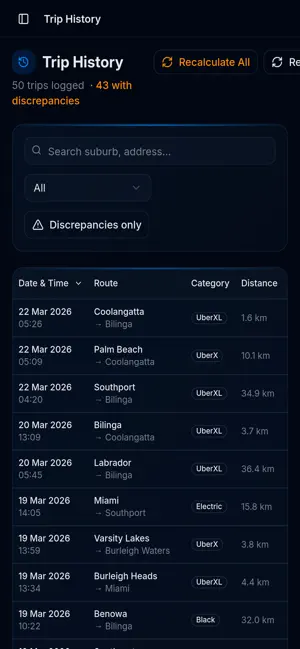
A look at earnings records, Trip History and Analytics. Screens shown are from the published app; layouts may vary by version.
Practical guides for the exact logbook, tax, fare, expense and income questions Australian rideshare drivers search for.
What to record over 12 continuous weeks and how the app helps.
Read the guide → Tax deductionsOrganise vehicle and operating expenses without losing the receipts.
Read the guide → BAS & GSTUnderstand the records behind 1A, 1B and quarterly estimates.
Read the guide → Fare checkCompare driver pay after a trip and keep a discrepancy record.
Read the guide → EarningsUnderstand online versus active-hour rates, trip earnings and expenses.
Read the guide → ExpensesScan receipts, identify GST and apply business-use percentages.
Read the guide → Income reportCreate a clearer history of gross income, expenses and net results.
Read the guide → ExportSend trips and expenses into a formatted spreadsheet.
Read the guide →Straight answers, with a deeper guide for every important question.
Record eligible journeys throughout a continuous 12-week period, including dates, odometer details, kilometres and purpose. EarningsPilotAU adds automatic trip detection, Welcome Home review and business/private classification.
Learn more about the Australian logbook method →Drivers commonly organise vehicle and operating costs such as fuel, cleaning, platform fees, phone use and eligible car expenses. Deductibility depends on your circumstances and records.
Learn more about rideshare deductions →ATO ride-sourcing guidance says GST registration applies regardless of turnover. The app helps organise income and GST-tagged purchases into 1A and 1B estimates for review.
Learn more about rideshare BAS and GST →Add a trip with Trip Photo Scanner or Full Entry, check the details and save it. Review the fare comparison when sufficient details and applicable rate data are available, and return to it in Trip History. A difference is a prompt to review records, not proof of a payment error.
Learn more about checking a fare →Log the trip data consistently, add expenses and compare performance by day, hour, ride category and suburb rather than relying only on a payout total.
Learn more about earnings tracking →Yes. The app supports AI-assisted receipt capture, GST flags, expense categories and business-use percentages so the source record remains connected to the calculation.
Learn more about expense tracking →The income substantiation report summarises recorded gross income, expenses, net operating income and monthly history. A recipient may still request other evidence.
Learn more about proof of income →Yes. Sync formatted trip and expense records with Australian currency formatting and discrepancy indicators, ready to review or share with an accountant.
Learn more about Google Sheets exports →Use the same email address to access your EarningsPilotAU account across the App Store iPhone app, Google Play Android app and Desktop Web App.
EarningsPilotAU is an independent app and is not affiliated with, endorsed by or sponsored by Uber, DiDi or any rideshare platform. Platform names describe compatible records or services.